
If your website is not showing on Google, you are not alone. This is one of the biggest problems that Nepali business owners face today. You invested lot of money for your website and talked about it to your friend’s circle, family, near and dear ones, and to your customers also.
But when someone search for your business or your service on Google – your website does not appear. Instead, it shows your competitors website. That is really frustrating when your efforts really don’t show the result you put on for it.
Some website may get the visitors but no customers. That is a different problem and we have already written about why websites get visitors but no customers. But if your website is completely missing from Google, this article will provide with few issues and a technical SEO guide for Nepali websites.
We’ll discuss about 7 such problems with technical SEO Audit Guide for Nepali websites.
1) Google Cannot Enter Your Website:

Think of Google like a delivery person who comes to your shop every day to check what is new. But if the door is locked, they turn around and leave. They have no idea what is inside.
Your website has a file called robots.txt. This file tells Google which pages it can visit. When your developer was building your website, they probably added a line to this file that says: “Do not enter.”
This is normal during development – you don’t want Google to see an unfinished website. But many developers forget to remove that line after the website goes live.
After completion of building the brand-new website, it goes live. So, your website is open for people but Google is still unable to visit the website. Month by month passed out but you wonder why the website is not showing on Google.
How to Check:
Open your browser and go to: yourwebsite.com/robots.txt
If you see the words Disallow: / on that page, this line is blocking Google from your entire website. You may reach out to your developer or concerned person to update it correctly.
Another quick check: type site:yourwebsite.com in Google. If nothing appears, Google has never properly visited your site.
How to Fix It:
Ask your developer or concerned person to:
- Remove the Disallow: / line from your robots.txt file
- Check every page for a tag called “noindex” and remove it from all public pages
This one fix alone has helped many Nepali websites suddenly appear on Google after months of being invisible.
Also read: Why some pages get indexed but still never rank – because passing this first step does not always mean you will appear in results.
2) Your Website Is Too Slow and not showing on Google:
Imagine you walk into a shop and ask for something. The shopkeeper takes 10 seconds just to look at you and respond. You leave. You go to the next shop.
Google does exactly the same thing with slow websites. If your website takes too long to load, Google pushes it down in the results – and shows faster websites instead.
Google checks three things about your speed. They call this Core Web Vitals:
- LCP (Largest Contentful Paint):
How fast does the main part of your page appear on screen? It should load in under 2.5 seconds. Most Nepali websites we check take 6 to 10 seconds. That is far too slow.
- INP (Interaction to Next Paint):
When someone clicks a button or link on your website, how fast does something happen? If nothing happens for 2–3 seconds, people think the website is broken.
- CLS (Cumulative Layout Shift):
Does your page jump around while loading? You know that feeling when you are about to tap a button and it suddenly moves? That is bad for SEO and for users.
Why Nepal Has This Problem More Than Others
Many affordable hosting plans in Nepal put hundreds of websites on the same server. When one website gets busy, all the others slow down too. Your website’s speed could be affected by someone else’s website — and you would never know.
Also, a lot of Nepali websites upload large photos straight from a phone camera. One uncompressed photo can make your page load 5 seconds slower.
How to Check
Go to pagespeed.web.dev – type in your website URL and check your score. Aim for a score above 60 on mobile.
How to Fix It
- Compress your images before uploading them. Use the free tool Squoosh – it works in your browser, no software needed.
- Use a better hosting plan. If you are paying very little for hosting, the server is likely your biggest speed problem.
- Add Cloudflare (free) – it speeds up your website automatically for visitors across Nepal.
Want to understand this more deeply? Read our full guide on how Core Web Vitals affect your Google ranking.
3) Google Does Not Know What Your Business Does
When Google reads your website, it has to guess what your business is about. Sometimes it guesses right. Often it does not.
There is a way to remove all the guessing. It is called schema markup – a small piece of code you add to your website that directly tells Google your business name, your address, your services, your working hours, and your phone number.
Without it, a dentist in Lalitpur and a pharmacy nearby might look the same to Google. With it, Google knows exactly what you offer – and can match you to the right searches.
A Real Example
Here is what a simple schema for a local Nepal business looks like:
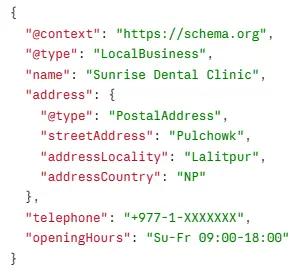
This code is not seen by your visitors. It is read only by Google. Think of it as a business card that you give directly to Google.
Most Useful Schema Types for Nepali Businesses
- LocalBusiness — for any business with a physical location in Nepal
- FAQPage — shows your questions and answers directly in Google results
- Service — clearly tells Google what services you offer
- Review — shows your star ratings in search results
How to Add It
If you use WordPress, the free Rank Math/Yoast plugin adds schema automatically through simple settings – no coding needed.
After adding it, test it here: Google Rich Results Test
This also connects to how Google decides whether to trust your website. Read more about E-E-A-T signals that affect your rankings.
4) Your Website Looks Broken on Mobile Phones
Here is something that surprises many Nepali website owners: Google ranks your website based on how it looks on a mobile phone – not on a computer.
This is called mobile-first indexing. It means if your website looks great on a laptop but is broken on a phone, Google will rank it poorly – even if desktop users have no complaints.
In Nepal, most people browse the internet on their phones. If your website is hard to use on a phone, you are losing customers before they even read your first sentence.
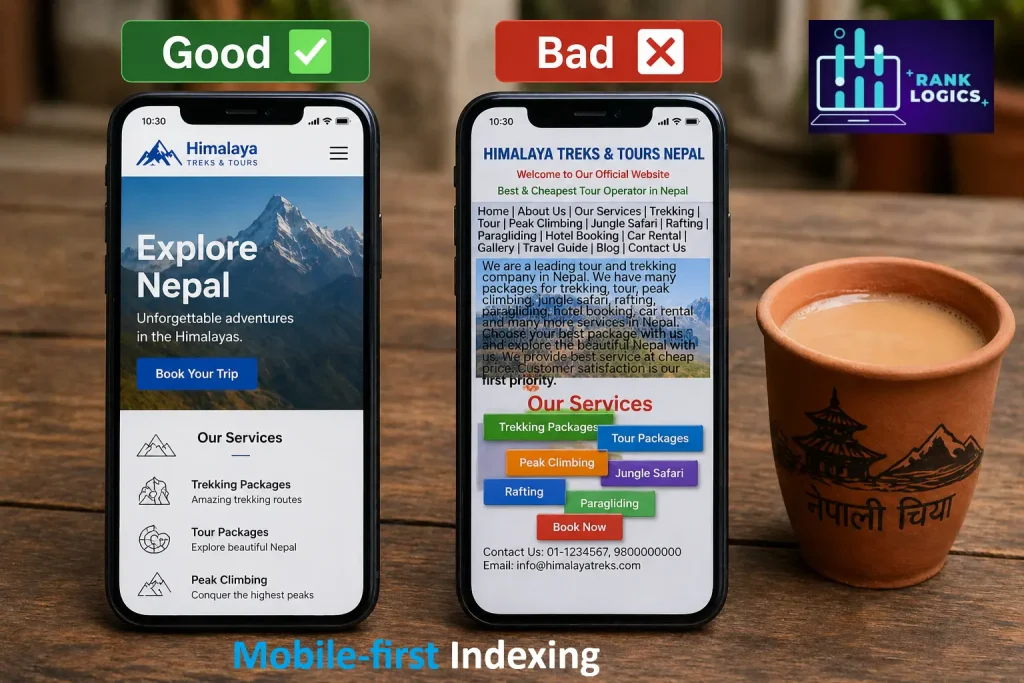
Signs Your Website Has Mobile Problems
- The text is too small to read without zooming in
- Buttons are too close together – hard to tap the right one
- You have to scroll sideways to see the full page
- Images overflow outside the screen
- Pop-ups cover the whole screen
How to Check
Go to: Google Mobile-Friendly Test
Type your website URL and click “Test URL.” Google will tell you immediately if your site passes or fails, and it will show you exactly what is broken.
How to Fix It
- Switch to a responsive WordPress theme – this means the website automatically adjusts to fit any screen. Free themes like Astra or Kadence do this well.
- Test on a real phone. Do not just check it in your browser. Use an actual Android phone – the kind your customers use – and click through your whole website.
- Remove full-screen pop-ups on mobile. Google penalizes these.
5) Google Has No Map of Your Website:
Imagine you run a big guesthouse with 20 rooms. A guest arrives at the front door but there is no reception, no signs, and no map of the rooms. They don’t know where to reach out, wander around and may find around only 5 rooms with confusion. The other 15 rooms are never discovered.
That is what happens to many websites. Google visits the homepage and follows links – but if some pages are not linked anywhere, Google never finds them.
An XML sitemap solves this. It is a file that lists every important page on your website, so Google knows exactly where to look.
Also, a robots.txt file works with the sitemap to tell Google: “Here is everywhere you are allowed to go – and here is the one area to skip.
What a Sitemap Looks Like
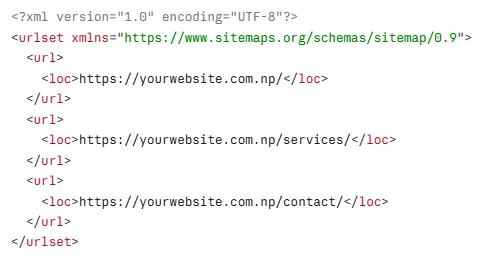
This file is not for human visitors. It is a direct guide for Google.
How to Check:
Type yourwebsite.com/sitemap.xml in your browser. If you see a list of URLs, your sitemap exists. If you see an error or blank page, you do not have one.
How to Fix It:
If you use WordPress, install the free Rank Math or Yoast SEO plugin. Both create your sitemap automatically and keep it updated when you add new pages.
Then go to Google Search Console → Sitemaps → Paste your sitemap URL → Click Submit.
That is it. Now Google has a complete map of your website and will check it regularly.
6) The Same Page Is Appearing at Two Different Addresses
This one confuses many people, but it is very common on Nepali websites.
Imagine your shop is at “New Road, Kathmandu.” But someone also gives out a different address for the same shop — “Newroad, Kathmandu” – and both addresses lead to the exact same place. Delivery people get confused. Google gets confused too.
This happens when your website is accessible at more than one URL address.
For example:
- http://abc.com and https://abc.com – same site, two addresses
- www.abc.com and abc.com – same site, two addresses
- /services/ and /services – same page, two addresses
When Google sees the same content at two addresses, it does not know which one to show in search results. So it often shows neither – or picks the wrong one.
This is called a duplicate content problem.
The Fix: Canonical Tags
A canonical tag is one simple line of code that you add to a page. It tells Google: “This is the real address. Use this one.“
Below is the code for it.
<link rel=”canonical” href=”https://abc.com/services/” />
WordPress SEO plugins like Rank Math or Yoast SEO add canonical tags automatically to every page.
For the http vs https problem, the better fix is a redirect – so anyone going to the http version gets automatically sent to the https version. Your developer can set this up in a few minutes.
A related problem is when two of your pages are competing for the same keyword. That is called keyword cannibalization — and it hurts both pages at the same time.
7) Your Website Is Marked as “Not Secure” and not showing on Google
Open your website right now. Look at the top of your browser. Do you see a padlock icon next to your URL?
If the padlock is missing – or if your URL starts with http:// instead of https:// – your website is marked as “Not Secure” by Google Chrome.
When visitors see this warning, many close the tab immediately. They think your website is dangerous. Google thinks the same – and pushes your website down in rankings.
The fix is called an SSL certificate. It is what turns http:// into https:// and adds that padlock.
How to Get SSL in Nepal
Most hosting providers in Nepal now give you a free SSL certificate. It is usually found in your hosting control panel under “SSL” or “Security.” Activating it usually takes one click.
If your hosting provider is charging extra for SSL, that is a sign you need a better provider.
After turning on SSL, one more step is needed: set up a redirect so that anyone who types the old http:// version gets automatically sent to the new https:// version. If you use WordPress, the free plugin Really Simple SSL does this for you automatically.
Once your website is secure, it also builds more trust in the eyes of Google. This connects to how Google evaluates your website’s overall reputation – something we cover in our guide on E-E-A-T signals that impact rankings.
What Happens After You Fix These Problems?
After fixing these 7 issues, you will not jump to number one on Google overnight. SEO takes a little time.
Usually, Google notices the changes within 2 to 4 weeks. After that, your rankings start improving over the next 1 to 3 months. The improvements are real and long-lasting — not like paid ads that stop the moment you stop paying.
Once the technical problems are fixed, the next step is local SEO — making sure your business shows up when people in your city search for your services. Our guide on Local SEO ranking factors in 2026 explains exactly what to do next for businesses in Kathmandu, Pokhara, Butwal, and Dhangadhi.
Also remember: showing up on Google is step one. Getting those visitors to actually call you or buy from you is step two. If your traffic is growing but your sales are not, read our guide on why websites get visitors but no customers.
Want Someone to Fix This for You?
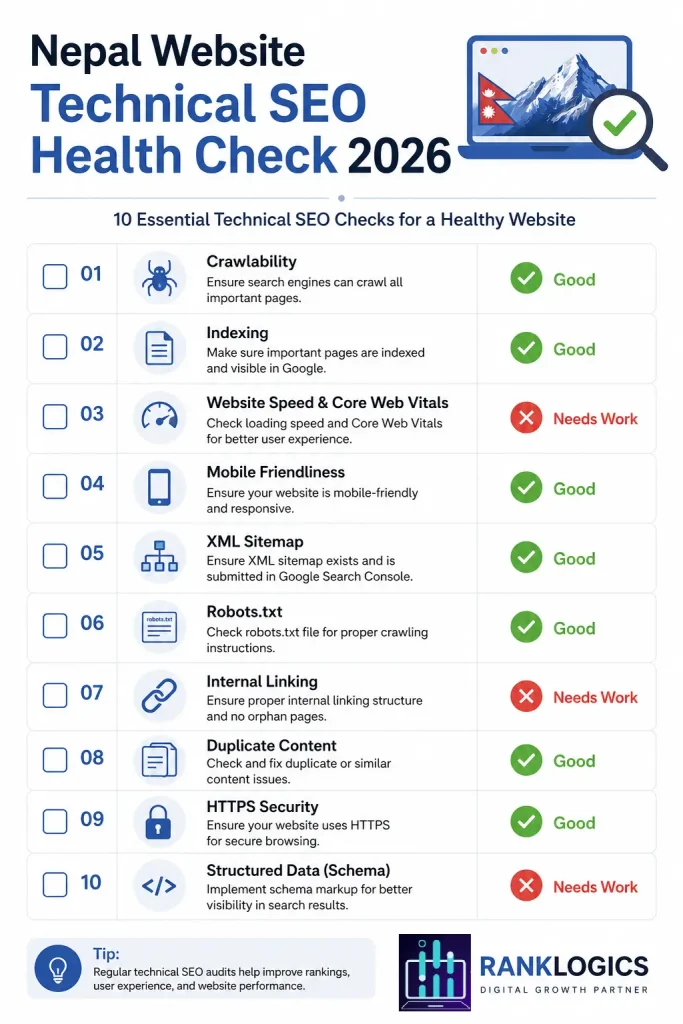
We know not everyone has the time – or wants the headache – of checking and fixing all of this themselves.
That is exactly why RankLogics exists. We helps businesses across the country fix the exact problems described in this article. From making sure Google can enter your site, to speeding it up, to making it safe and mobile-friendly – our Technical SEO services cover everything.
Get a free SEO check for your website today at RankLogics. We will tell you exactly what is wrong – and how to fix it.